Your Live Video Command Center
Second Screen Player is a professional video playback system designed for live events, conferences, and houses of worship. Send video, images, and audio to a second screen with 11 transition types, real-time audio mixing, per-item color correction, and playlist automation — all from a single operator interface.
Gallery
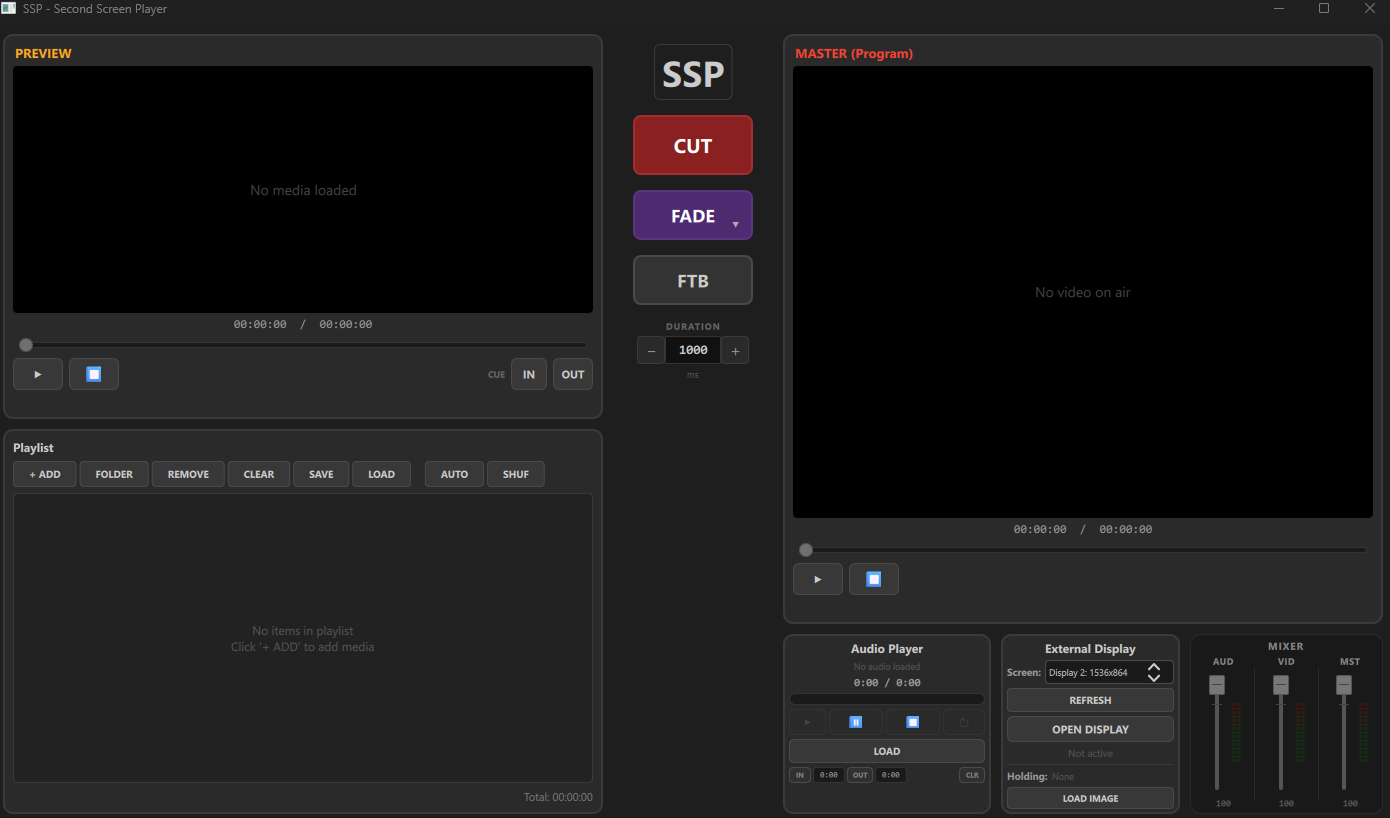
Overview — Preview & Program monitors, playlist, transitions, 3-channel audio mixer, and display control
Key Features
Second Screen Output
Full-screen output to any connected display with automatic multi-monitor detection. Live preview and program monitoring side by side.
Preview & Program
Dual-monitor workflow with live preview and program output. Prepare your next media while the current one plays on screen.
11 Transition Types
Cut, Crossfade, Fade-to-Black, Wipe (4 directions), Push (4 directions), and Zoom In/Out — all with adjustable duration (100–5000ms).
External Display Control
Select output screen from a dropdown, open/close display with one click, and refresh connected monitors. Auto-fullscreen on secondary screen.
Playlist & Autoplay
Build playlists with drag-to-reorder, autoplay, shuffle, loop toggle, per-item loop, IN/OUT trim points, adjustable image hold duration, and total duration footer. Video thumbnails for quick visual identification.
Holding Image
Upload a logo or branding image that displays on the output screen between content. Perfect for conferences and live events. Saved with your playlist file and auto-restored on load.
3-Channel Audio Mixer
AUD, VID, and MST faders with independent volume. 15-segment LED-style stereo VU meters with real PCM-based metering and color-coded levels.
Per-Item Color Correction
Zoom, independent Zoom W/H, brightness, contrast, saturation, color temperature (warm/cool), per-item volume trim, and clip speed (0.25x–2.0x). Live preview thumbnail with real-time effect updates and one-click RESET.
Cylinder Scroll
Seamless horizontal scroll effect designed for 360° LED walls and cylindrical displays. Choose direction (Left/Right) and speed, saved per item with the playlist.
Clip Speed Control
Set per-item playback rate from 0.25x to 2.0x directly from the Edit popup. Speed is saved with the playlist and applied the moment the item goes live.
In/Out Points & Countdown
Set precise IN/OUT trim marks per video. Program monitor shows countdown timer with color-coded warnings (red <10s, amber <30s) and video resolution/FPS badge.
Dedicated Audio Player
Independent audio channel for background music with cue IN/OUT points, loop, stereo VU metering, and volume control.
Rename & Edit Items
Rename playlist items with custom display names. Edit popup with live thumbnail preview showing all adjustments in real time.
Keyboard Shortcuts
Full keyboard control: Enter=CUT, F=Fade, B=FTB, Space=Take, 1–9=Load items, Ctrl+S=Save, Ctrl+O=Open. Designed for fast live operation.
Save & Load Projects
Save playlists as .ssp project files with all settings preserved (IN/OUT, loop, audio, color corrections, volume trim). Reload your complete show setup instantly.
Perfect For
- Conferences and corporate events
- Houses of worship and church services
- Live event production and AV teams
- Theater and stage productions
- Sports venues and public displays
- Education and training sessions
Supported Formats
Second Screen Player supports all major video, image, and audio formats:
- MP4, MKV, AVI, WEBM, MOV, WMV, FLV, M4V, MPG, MPEG, TS — Video
- PNG, JPG, JPEG, GIF, BMP, SVG, WEBP — Images
- MP3, FLAC, WAV, AAC, OGG, WMA, M4A — Audio
Why Choose Second Screen Player?
Unlike general-purpose media players, Second Screen Player is purpose-built for live events. Every feature — from the 11-type transition engine to the 3-channel mixer and per-item color correction — is designed for operators who need reliable, real-time control over what appears on screen. No bloat, no complexity, just professional playback that works when it matters.
System Requirements
- Windows: Windows 10 or later (64-bit)
- macOS: Coming Soon
- RAM: 4 GB minimum
- Disk: 414 MB free space
- Display: 1280 x 720 minimum (second display recommended)
- GPU: Hardware-accelerated video decoding recommended